
Host on GitHub Pages
Use these instructions to enable continuous deployment from a GitHub repository to GitHub Pages.
Do not commit the contents of the publishDir directory to your repository. Hugo recreates this directory when you build your project.
Types of sites
There are three types of GitHub Pages sites: project, user, and organization. Project sites are connected to a specific project hosted on GitHub. User and organization sites are connected to a specific account on GitHub.com.
See the GitHub Pages documentation to understand the requirements for repository ownership and naming.
Prerequisites
Please complete the following tasks before continuing:
- Create a GitHub account.
- Log in to your GitHub account.
- Create a GitHub repository for your project.
- Create a local Git repository for your project with a remote reference to your GitHub repository.
- Create a Hugo project within your local Git repository and test it with the
hugo servercommand. - Commit the changes to your local Git repository and push to your GitHub repository.
Procedure
- Step 1
- Visit your GitHub repository. From the main menu choose Settings > Pages. In the center of your screen you will see this:

Change the Source to
GitHub Actions. The change is immediate; you do not have to press a Save button.
- Step 2
- Create a
hugo.yamlfile in the.github/workflowsdirectory, adjusting the tool versions and time zone as needed..github/workflows/hugo.yamlname: Build and deploy on: push: branches: - main workflow_dispatch: permissions: contents: read pages: write id-token: write concurrency: group: pages cancel-in-progress: false defaults: run: shell: bash jobs: build: runs-on: ubuntu-latest env: # Define tool versions DART_SASS_VERSION: 1.104.0 GO_VERSION: 1.27.0 HUGO_VERSION: 0.166.0 NODE_VERSION: 24.20.0 # Set the build time zone TZ: Europe/Oslo steps: - name: Checkout uses: actions/checkout@v7 with: submodules: recursive fetch-depth: 0 lfs: false - name: Setup Pages id: pages uses: actions/configure-pages@v6 - name: Create a local tools directory run: | mkdir -p "${HOME}/.local" - name: Install Go if: hashFiles('go.mod') != '' uses: actions/setup-go@v7 with: go-version: ${{ env.GO_VERSION }} cache: false - name: Install Node.js if: hashFiles('package-lock.json') != '' uses: actions/setup-node@v7 with: node-version: ${{ env.NODE_VERSION }} - name: Install Dart Sass run: | echo "Installing Dart Sass ${DART_SASS_VERSION}..." curl -sfL --output-dir "${{ runner.temp }}" -O "https://github.com/sass/dart-sass/releases/download/${DART_SASS_VERSION}/dart-sass-${DART_SASS_VERSION}-linux-x64.tar.gz" tar -C "${HOME}/.local" -xf "${{ runner.temp }}/dart-sass-${DART_SASS_VERSION}-linux-x64.tar.gz" echo "${HOME}/.local/dart-sass" >> "${GITHUB_PATH}" - name: Install Hugo run: | echo "Installing Hugo ${HUGO_VERSION}..." curl -sfL --output-dir "${{ runner.temp }}" -O "https://github.com/gohugoio/hugo/releases/download/v${HUGO_VERSION}/hugo_${HUGO_VERSION}_linux-amd64.tar.gz" mkdir "${HOME}/.local/hugo" tar -C "${HOME}/.local/hugo" -xf "${{ runner.temp }}/hugo_${HUGO_VERSION}_linux-amd64.tar.gz" echo "${HOME}/.local/hugo" >> "${GITHUB_PATH}" - name: Log tool versions run: | echo "Logging tool versions..." command -v sass &> /dev/null && echo "Dart Sass: $(sass --version)" || echo "Dart Sass: not installed" command -v go &> /dev/null && echo "Go: $(go version)" || echo "Go: not installed" command -v hugo &> /dev/null && echo "Hugo: $(hugo version)" || echo "Hugo: not installed" command -v node &> /dev/null && echo "Node.js: $(node --version)" || echo "Node.js: not installed" - name: Configure Git run: | echo "Configuring Git..." git config --global core.quotepath false - name: Fetch full Git history run: | if [[ $(git rev-parse --is-shallow-repository) == true ]]; then echo "Fetching full Git history..." git fetch --unshallow fi - name: Initialize Git submodules run: | if [[ -f .gitmodules ]]; then echo "Initializing Git submodules..." git submodule update --init --recursive fi - name: Install Node.js dependencies run: | if [[ -f package-lock.json ]]; then echo "Installing Node.js dependencies..." npm ci fi - name: Cache restore id: cache-restore uses: actions/cache/restore@v6 with: path: ${{ runner.temp }}/.cache/hugo key: hugo-${{ github.run_id }} restore-keys: hugo- - name: Build run: | echo "Building the project..." hugo build \ --gc \ --minify \ --baseURL "${{ steps.pages.outputs.base_url }}/" \ --cacheDir "${{ runner.temp }}/.cache/hugo" - name: Cache save uses: actions/cache/save@v6 with: path: ${{ runner.temp }}/.cache/hugo key: ${{ steps.cache-restore.outputs.cache-primary-key }} - name: Upload artifact uses: actions/upload-pages-artifact@v5 with: include-hidden-files: false path: ./public deploy: runs-on: ubuntu-latest needs: build environment: name: github-pages url: ${{ steps.deployment.outputs.page_url }} steps: - name: Deploy to GitHub Pages id: deployment uses: actions/deploy-pages@v5 - Step 3
- In your project configuration, change the location of the image cache to the
cacheDiras shown below:caches: images: dir: :cacheDir/images[caches] [caches.images] dir = ':cacheDir/images'{ "caches": { "images": { "dir": ":cacheDir/images" } } }See configure file caches for more information.
- Step 4
- Commit the changes to your local Git repository and push to your GitHub repository.
- Step 5
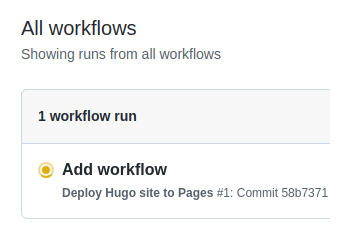
- From GitHub’s main menu, choose Actions. You will see something like this:
- Step 6
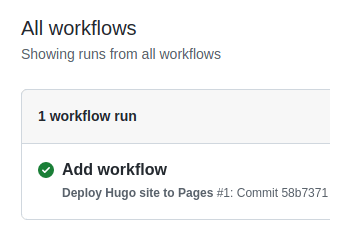
- When GitHub has finished building and deploying your site, the color of the status indicator will change to green.
- Step 7
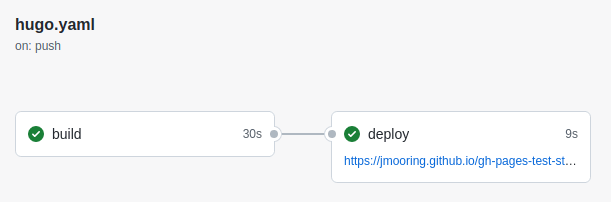
- Click on the commit message as shown above. Under the deploy step, you will see a link to your live site.
In the future, whenever you push a change from your local Git repository, GitHub Pages will rebuild and deploy your site.